Kubernetes Isekai
文章目录 · 6 节
Kubernetes Isekai
花澪Kubernetes Isekai (異世界): Gamifying Kubernetes Education in Free AWS Academy Learner Lab
Kubernetes Isekai (異世界) is an open-source RPG that transforms Kubernetes education into an exciting adventure. Designed for students, it offers hands-on learning through interactive tasks and dynamic NPC interactions, all within the cost-effective AWS Academy Learner Lab. Dive into the world of Kubernetes with this engaging and practical educational tool!
Introduction
Kubernetes Isekai (異世界)is an open-source RPG designed for hands-on Kubernetes learning through gamification. Ideal for junior to Higher Diploma students at Hong Kong Institute of Information Technology (HKIIT), it transforms Kubernetes education into an engaging adventure.
- Role-Playing Adventure: Students interact with NPCs who assign Kubernetes tasks.
- Task-Based Learning: Tasks involve setting up and managing Kubernetes clusters.
- Free Access: Uses AWS Academy Learner Lab with Minikube or Kubernetes.
- Scalable Grading: AWS SAM application tests Kubernetes setups within AWS Lambda.
- Progress Tracking: Students track progress and earn rewards.
This game offers practical Kubernetes experience in a fun, cost-effective way. - GenAI Chat: Integrates Generative AI to make NPC interactions more dynamic and fun, enhancing the overall learning experience. (Under development)
Demo
Overview
Kubernetes Isekai Architecture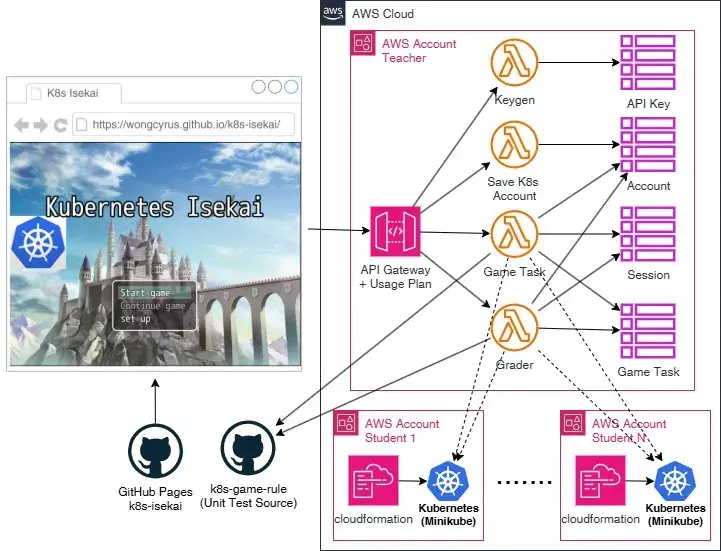
The primary guideline for this project is that educators should deploy and learn Kubernetes (k8s) for free using the AWS Academy Learner Lab while keeping costs to a minimum. To achieve this, we utilize the AWS Serverless Application Model (SAM) framework and run everything, including the kubectl command, using AWS Lambda.
The project is composed of three repositories:
- k8s-grader: This repository includes the AWS SAM backend for Kubernetes Isekai (異世界). It can be deployed to the AWS Academy Learner Lab, allowing educators and students to explore and learn Kubernetes for free. The deployment will be in the teacher’s AWS account. Additionally, it contains the CloudFormation template to create Amazon EC2 instances with Minikube for each student’s AWS account.
- k8s-game-rule: This repository includes unit tests, game instructions, and test code for the students’ Kubernetes environments.
- k8s-isekai: This repository hosts a web game created with RPG Maker and the game site is hosted on GitHub Pages.
How does it work?
Game Task Lifecycle
Kubernetes Isekai Game Task Lifecycle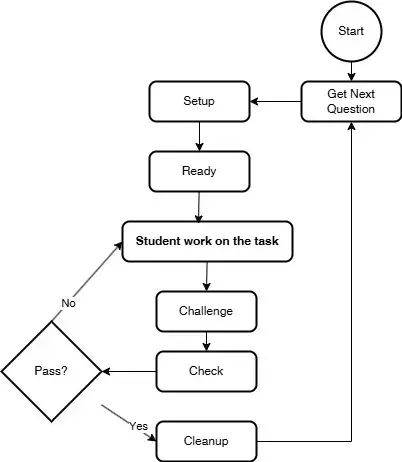
k8s-game-rule repository contains a set of unit tests, structured with the following phases:
- Setup: Create the necessary Kubernetes entities as the initial checkpoint for the task, guided by instruction.md.
- Ready: Verify and ensure the completion of the setup phase. (Optional)
- Answer: Provide the solution for the task, intended for test development, but it will never be executed within the k8s-grader.
- Challenge: Apply load or trigger events in Kubernetes. (Optional)
- Check: Verify that the Kubernetes configuration or values match the expected results.
- Cleanup: Restore the Kubernetes environment to its state before the setup phase.
The overall design ensures that tasks can be completed independently or in sequence with task dependencies. Additionally, teachers can create debugging tasks for students by deploying bugs and having students fix them, utilizing the Challenge phase to test scaling strategies.
To prevent students from copying answers, each student receives a unique set of session objects, generating different task instructions for each student.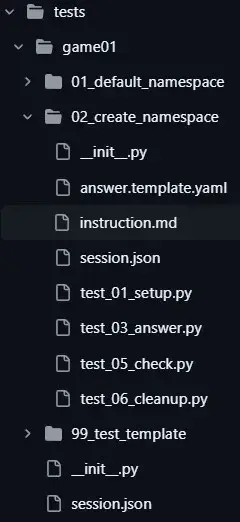
Game level session game01/session.json
1 | { |
Task level session game01/02_create_namespace/session.json
1 | { |
game01/02_create_namespace/instruction.md
1 | Create a namespace called '{{namespace}}'. |
game01/02_create_namespace/answer.template.yaml
1 | apiVersion: v1 |
We utilize Jinja2 to render the instructions, answers, and tests. The session at the task level will override the session at the task level. In this example, the namespace contains a random number between 1 and 10.
1 | import logging |
game01/02_create_namespace/test_05_check.py
1 | import logging |
We have the option to use either the Python Kubernetes library or the kubectl command for testing.
、
Keygen Lambda Function
The Keygen Lambda function is designed to generate and manage API keys for users. It validates the provided secret and email, retrieves an existing API key or creates a new one, associates the API key with a specific usage plan, and returns the API key value to the user. This function includes methods for interacting with AWS API Gateway and generating tokens.
Teachers must create individual API keys for each student. These keys are governed by a AWS API gateway usage plan that includes specific rate and usage limits.
1 | APIUsagePlan: |
Save k8s Lambda Function
The Save k8s Lambda function handles saving Kubernetes account information and supports both GET and POST HTTP methods. The GET method returns an HTML form for user input, while the POST method processes multipart form data to save account details. This function includes methods for reading HTML files, decoding base64-encoded data, parsing multipart form data, and validating input. It ensures that Kubernetes account information is saved accurately and efficiently.
Whenever students restart their AWS Academy Learner lab, they must re-enter their Kubernetes connection details due to the IP address of the EC2 instance changing after a stop and start. Additionally, we provide a script to download the necessary information and files.